BitLife Driving Test Answers: Road Signs and How to Pass
A practical guide to reading the sign, matching the answer family, and passing the BitLife driving test without memorizing option positions.


The BitLife driving test is easier when you treat it as a recognition problem instead of a memory test. A player may search for all BitLife driving test answers after seeing several choices that look similar, but the durable solution is to identify the sign family first. Shape, border color, symbol, and road context narrow the answer before you compare the wording.
This guide focuses on the driving-test answers and road-sign clues that players most often need. It does not promise that every version uses the same question order, image crop, or exact answer text. Updates, platforms, and localization can change labels. Use the table as a visual key, then read the option on your own screen before confirming.
The driving test is also separate from the Pilot's License test. Both are license-style activities, but a driving question should be solved from road-sign meaning, while a pilot question usually uses aviation instruments, forces, or aircraft controls. Keeping those two answer sets separate prevents you from applying the wrong memory shortcut.
You do not need to turn this into a long reset cycle. Prepare a small cash reserve, learn the major sign shapes, take the test once, and record the category of any missed question. A failed attempt is useful evidence: it tells you whether the problem was a sign meaning, a translated label, a shuffled option, or simply a different question than the one you expected.
What the BitLife Driving Test Is Checking
The exact screen can vary, but most road-sign questions reduce to a few pieces of visual information. Read them in the same order every time so a changed image or translated label does not throw you off.
- Shape — An octagon strongly points to Stop, an inverted triangle points to Yield, and a diamond usually introduces a warning. Shape is often the fastest clue when the image is small.
- Color — Red commonly signals a prohibition or required action, yellow or orange signals a warning, and white signs often carry regulatory or guidance information. Do not use color alone; combine it with the symbol.
- Symbol — A walking person suggests a pedestrian crossing, a train crossbuck suggests a railroad crossing, a curved arrow can indicate a winding road, and a white horizontal bar inside a red circle means do not enter.
- Answer wording — The correct option may use a short label such as Stop, Yield, Warning, Railroad Crossing, Pedestrian Crossing, or Do Not Enter. Choose the meaning, not the longest sentence or the option that appears in a familiar position.
- Version context — The game may crop a sign, translate its label, or show a slightly different road-sign illustration. When two choices feel close, identify the central symbol first and treat the table below as a category guide rather than a promise of exact wording.
BitLife Driving Test Answers by Road-Sign Clue
Use this answer map for the most common sign families. It is intentionally organized by clue instead of answer position because the option order can change between attempts.
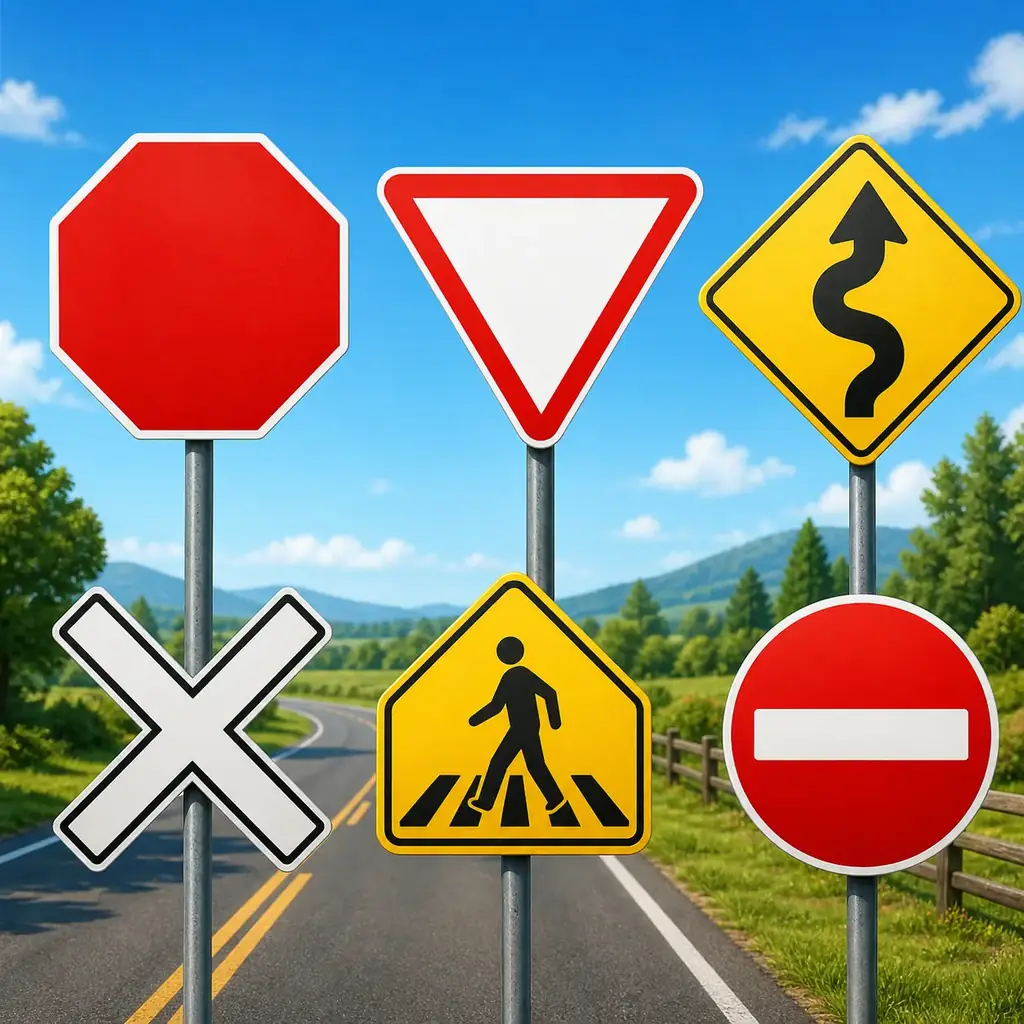
| Visual clue | Likely answer | How to recognize it |
|---|---|---|
| Red eight-sided sign | Stop | The octagon is the strongest clue; it represents a required stop. |
| Red-and-white inverted triangle | Yield | The downward triangle means give way to other traffic. |
| Yellow diamond with a curved or winding arrow | Winding road or curve warning | A yellow diamond warns about the road ahead rather than banning an action. |
| White X-shaped railroad crossbuck | Railroad crossing | The crossbuck marks a rail crossing and is distinct from a normal intersection sign. |
| Yellow sign showing a person or crossing stripes | Pedestrian crossing | The person and crossing pattern point to people crossing the road. |
| Red circle with a white horizontal bar | Do not enter | The white bar is a prohibition symbol, not a speed or warning sign. |
| White sign with a car symbol | Vehicle or road-use instruction | Read the symbol and nearby border; it may describe a vehicle-only or road-use rule rather than a general warning. |
| Number inside a regulatory sign | Speed limit or numbered restriction | The number is the key information, so choose the option that describes a limit or restriction. |
Do not memorize answer positions
The most useful BitLife driving test answers are meanings: Stop, Yield, warning, crossing, or prohibition. If the order changes, the sign still tells you which family to choose.
How to Pass the Driving Test Without Memorizing Positions
A repeatable method is more reliable than a screenshot that shows one answer in slot two. Follow the same five steps whenever you see the license question.

1. Pause before reading the options
Look at the sign itself for a moment. Decide whether its shape is regulatory, warning, directional, or a crossing marker before the answer wording distracts you.
2. Name the sign in plain language
Say the meaning to yourself: stop, yield, winding road, railroad crossing, pedestrian crossing, or do not enter. A plain-language label is easier to compare than a vague visual impression.
3. Reject answers from the wrong family
If the sign is an octagon, remove choices that describe a warning or a yield. If it is a yellow diamond, do not let a red prohibition answer win just because it sounds urgent.
4. Check the exact option text
Localized versions may use a different noun or word order. Choose the option that describes the same traffic meaning, not necessarily the phrase you saw in an English guide.
5. Record the category if you miss
After a failure, write down the visual clue rather than guessing from memory. The next attempt becomes easier when you know whether you missed a symbol, a color, or a translated label.
What to Do After a Failed Attempt
A failed driving test does not mean the whole life is ruined. Diagnose the narrow problem and protect the rest of the run before paying for another try.
- Review the image category — Was the sign a warning, a required action, or a crossing marker? The category is more useful than trying to remember whether the correct choice was on the left or right.
- Keep a cash buffer — License activities cost money in many runs. Avoid spending the last of your cash on a retry if the character still needs food, school, rent, or another career requirement.
- Check the option wording — A translated answer may look unfamiliar even when the sign is correct. Compare the symbol and meaning, and do not assume a short option is wrong because it lacks extra explanation.
- Try again when the option returns — If the license activity is temporarily unavailable, age up or revisit the relevant menu according to the version you are playing. A refresh does not replace learning the sign, but it can restore the action.
Common Mistakes and Version Differences
Most bad advice comes from turning one successful screenshot into a universal rule. Keep these boundaries in mind when comparing guides or community posts.
- Memorizing answer positions — A correct answer on the top row in one screenshot may move after a retry. Memorize Stop or Yield, not the location of the button.
- Confusing warning and prohibition — A yellow diamond warns about a road condition; a red circle or red bar often restricts an action. The emotional tone of the symbol is not enough—read the shape.
- Mixing driving and pilot answers — The Pilot's License test uses aviation concepts, while the driving test uses road signs. Keep the two guides as separate reference sets.
- Treating every community list as current — Community answers are useful clues, but a different update or localization may rename a sign. Verify the image and visible wording in your own run.
- Overwriting the main life goal — A license is one useful milestone, not a reason to ruin a carefully planned model, astronaut, business, or challenge run. Keep health, money, and the primary route stable while you retry.
BitLife Driving Test FAQ
References and context
- Official support context: BitLife Support
- Road-sign answer coverage checked: GameRant BitLife driving-test guide
- Additional answer coverage checked: GamePur BitLife driving-test guide
- Community-style guide coverage checked: Destructoid BitLife driving-test guide
Last updated: August 10, 2026