BitLife Landlord Guide: How to Buy, Rent, and Manage Property
A practical route from checking access and buying a first home to choosing tenants, handling upkeep, and deciding whether a rental is worth keeping.

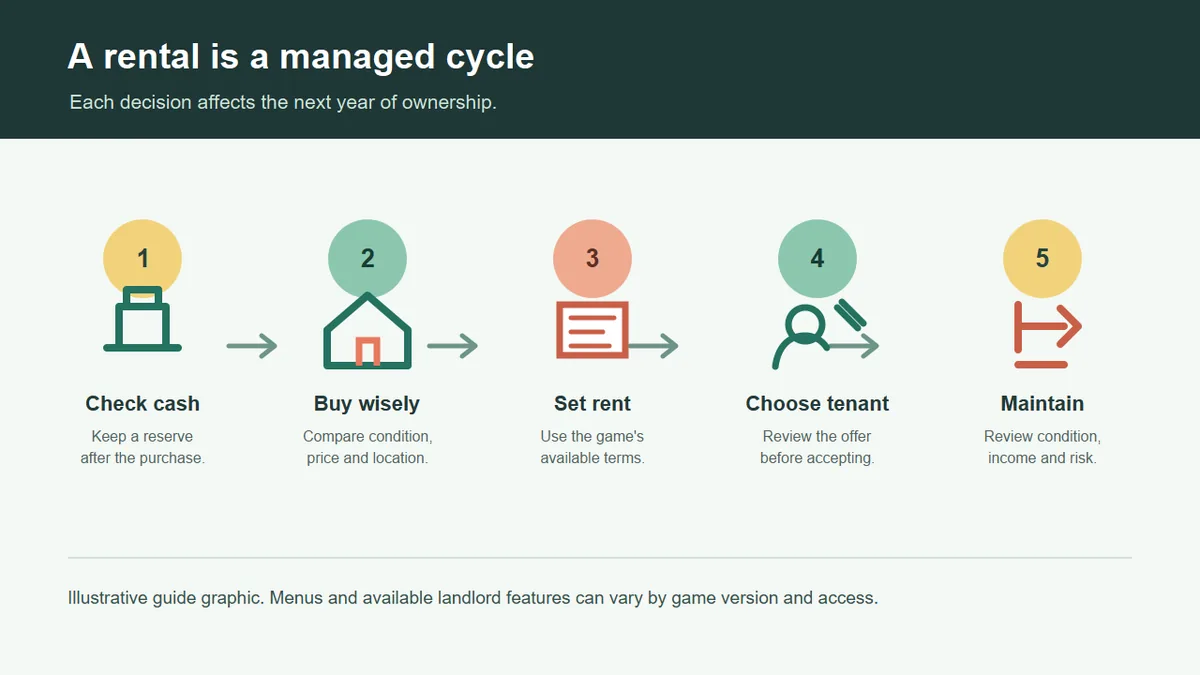
How the BitLife landlord route works
A BitLife landlord guide needs to cover more than buying a house. The rental route links feature access, purchase cash, property condition, rent, tenant events, and upkeep. A home can look attractive and still be a poor first choice if it uses every dollar or brings more repair risk than the character can absorb.
Treat the first home as a learning run. Confirm that landlord options appear in your game, then learn what the current menus and yearly reports show. Features and labels can change between builds or depend on expansion access, so use a repeatable decision process instead of memorizing an older button sequence.
Start with one property
A single rental makes it easier to see whether rent, condition changes, and tenant events are producing a manageable result before you commit more of the character's money.
BitLife landlord access and cash reserve
Before planning a landlord strategy, check whether property-rental or Landlord expansion features are available in your current game. Access can depend on version, platform, or purchased content. If the relevant choices are missing, verify the Marketplace instead of assuming that aging up or changing careers will unlock them.
Separate purchase money from operating money. Keep a reserve for a repair or a vacant period, using the balance and reports shown in your game as evidence. Since the game may simplify real-world costs, buy only when the character can respond to an unfavorable event without immediately selling the home.
- Verify the feature first - Look for the current landlord or rental options in the game itself and confirm any access requirement before saving for a purchase.
- Protect a reserve - Do not commit all available cash to the purchase; retain a buffer for the property and the character's normal life costs.
- Read the listing - Use the information actually shown in your build. Do not assume every property exposes the same condition, location, or rent details.
Choose your first BitLife rental property
Compare the full commitment, not just the asking price. Check the cash left after buying, the displayed condition, available rent terms, and whether the character can recover if the property needs attention. A cheap home may need work; an expensive one may leave no room for upkeep.
For a first rental, choose a home that can survive a bad year. Learn how your build reports rent, repairs, tenant events, and vacancies before buying more. Once you can explain the first property's yearly result, use the same checklist to compare another home.
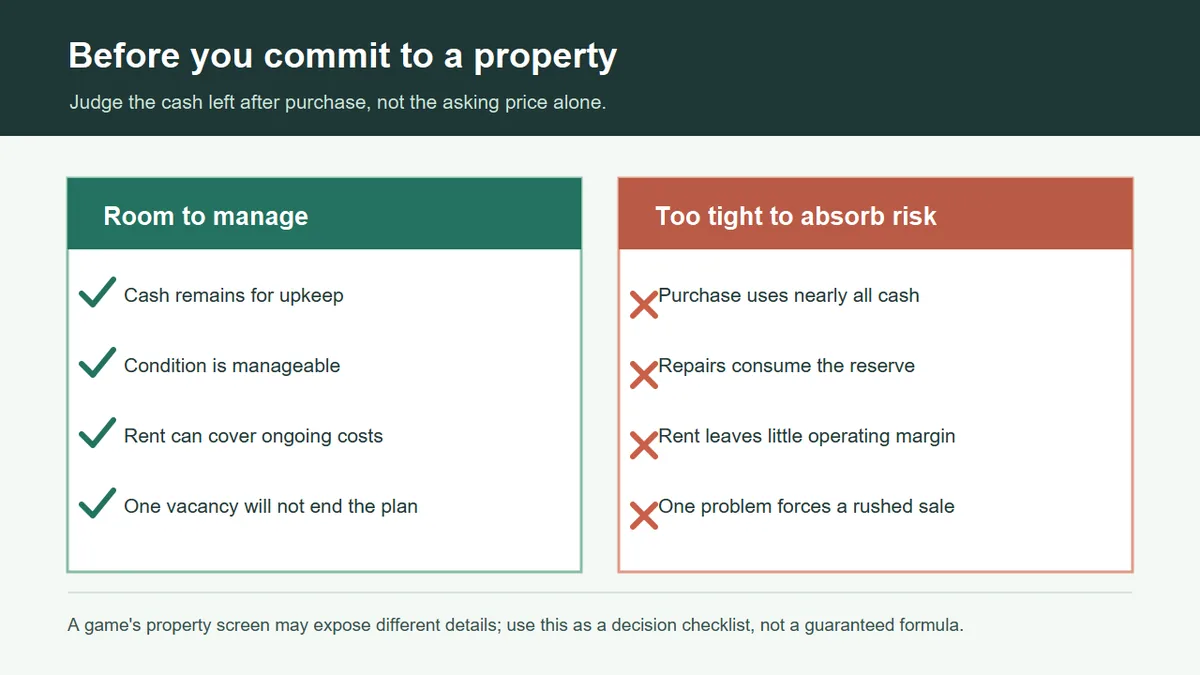
- Purchase price - Check whether the purchase still leaves a usable balance instead of turning the character's finances into a single-property bet.
- Condition and work - If the listing or property page shows condition or repair needs, include them in the decision before you rent it out.
- Expected rent - Compare the rent terms the game offers with the cash committed and the likelihood of recurring care. Avoid treating one displayed rent figure as guaranteed profit.
BitLife landlord rental workflow
Menu names may vary, so use a consistent loop: inspect before listing, read the rental settings, and note the property's condition and cash balance after a tenant moves in. Age up only when you are ready to review the next event or report.
Track the initial cost, condition, rent setting, and any upkeep event. A simple baseline helps distinguish gross rent from progress. If an option is missing, use the labels in your current build rather than copying an old screenshot.
- Open the landlord menu - Use the current property or Activities path only if it appears in your build.
- Inspect and buy - Review price and condition, then preserve a cash reserve.
- List and choose - Read the available rent terms and tenant offer before accepting.
- Review before scaling - Check the next year's notices, condition, events, and balance before buying another home.
Use the current interface
Guides can help you understand the system, but the current game's visible options decide which actions your save can take.
Set rent and review BitLife tenant offers
Consider rent alongside property cost, condition, and possible vacancy. If several terms are offered, compare them with the character's cash needs. A high asking price may have trade-offs, so use the response shown in your build rather than assuming one setting always wins.
Read a tenant offer before accepting it. Compare the displayed payment, lease terms, or character details when available; do not assume a hidden scoring formula. If the terms look poor, wait or adjust the listing. After acceptance, compare future events and property reports with the starting condition.
| Situation | Possible response | Reason to compare |
|---|---|---|
| First listing | Choose terms the character can sustain during a vacancy. | The offer should fit the asset and reserve. |
| Several offers | Compare the details shown and select a suitable tenant. | The highest number may not be the best fit. |
| No suitable offer | Review the listing and property before waiting or changing rent. | The home may need attention or a different setting. |
BitLife landlord upkeep and tenant problems
When the game reports damage, a complaint, a vacancy, or a tenant problem, read the full event before acting. Some prompts may call for repair; others may make ending a tenancy or leaving the home vacant sensible. Choose from the options actually shown and consider whether the property is still worth maintaining.
Keep maintenance proportional to the asset. If repairs consume cash while rent stays weak, pause expansion and review condition and yearly results. A vacancy also means lost rent, so compare it with the risk of repeating a poor arrangement. Challenge runs may require a particular objective; a normal wealth run gives you more room to leave a marginal home.
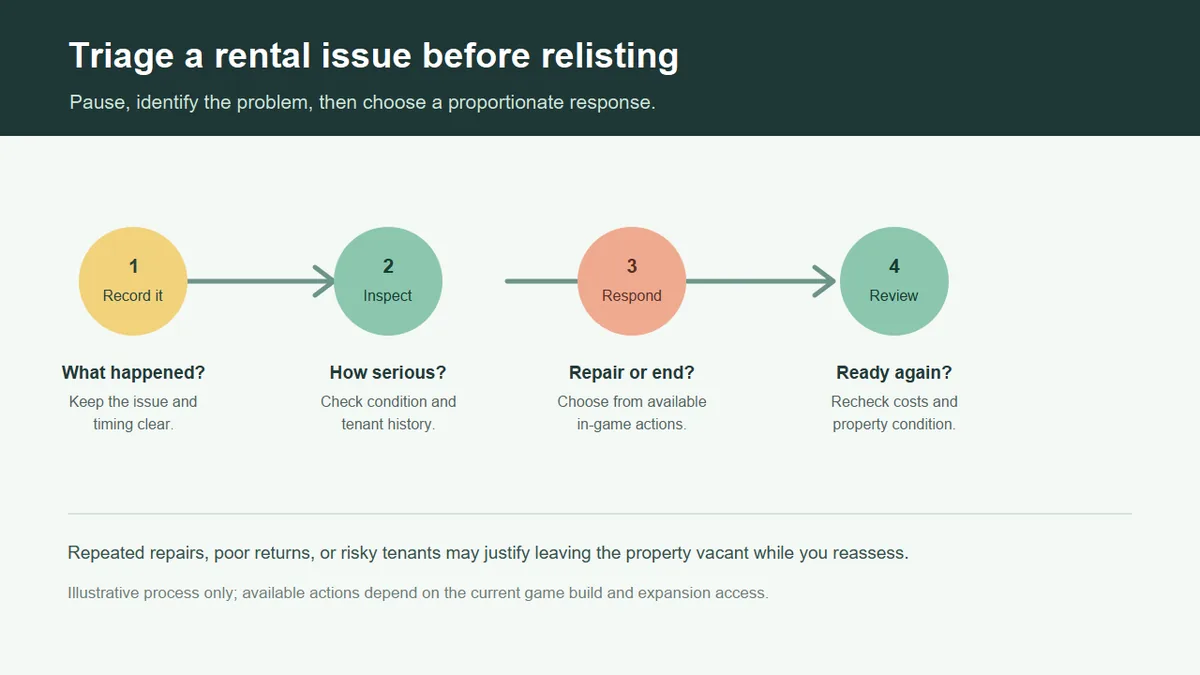
- Record the event - Note condition and displayed cost so you can judge the result later.
- Fix before relisting - Resolve important property issues before accepting another tenant.
- Recheck the terms - After a tenancy ends, compare condition and rent before listing again.
Judge results from a BitLife rental
Rent is revenue, not proof of a successful property. Compare the character's balance and the home's condition over several years, including the purchase, repairs, and vacancy time the game reports. Do not import real-world yields or assume a fixed return when the game uses its own simplified rules.
Ask whether the property improved the character's position, remains manageable, and still deserves the cash tied up in it. If the result is unclear, keep one home and review another year. If repeated costs outweigh the benefits, stop scaling and consider an available exit action.
Track net progress
Compare the balance and property condition before and after a year. Do not count every rent payment as profit or assume the game models every real-world ownership cost.
BitLife landlord mistakes and challenge planning
Avoid buying several homes before learning how one rental behaves. Expansion ties up more cash and adds conditions, listings, and tenant events to review. Also avoid spending the whole reserve on a prestigious property or accepting the first offer without checking its terms.
For a landlord challenge, read every objective first. Confirm whether it asks for ownership, active tenants, a number of rentals, or a later action such as an eviction. Follow the live objective text because challenge requirements can change, and keep enough money to finish the route.
- Use evidence to expand - Scale from the first property's result, not a headline rent figure.
- Follow visible options - Compare the rent, tenant, and repair choices shown in the current save.
- Separate challenge goals - A required task may not be the best long-term landlord choice.
A cautious BitLife first-property plan
For a first attempt, confirm access and compare a few properties without draining the character's cash. Choose one whose price and condition you can explain, list it using the terms shown in your build, and review the next report before making another large move.
After the first home establishes a pattern, decide whether to keep it, adjust rent, repair it, wait through a vacancy, or try a second property. Change one major factor at a time so the result is easier to read. The BitLife money guide compares property with careers and other wealth routes; the business guide covers company management.
- Confirm access - Check the current version and expansion options.
- Keep a reserve - Include normal costs and upkeep in the purchase decision.
- Buy one home - Use visible listing details and keep the first test manageable.
- Review before scaling - Check rent, events, condition, and cash after a year; add or exit based on the result.
BitLife landlord FAQ
Sources and game-version note
- BitLife official announcement about the landlord expansion: Read the @BitLifeApp announcement
- The game's current menus and Marketplace are the final reference for feature access and labels. Check the version available in your game
Last updated: October 22, 2026